
Buying guide · reviewed 21 October 2026
CNFans timed-order guide: payment, purchase and the stages after the sale
A timed listing adds a deadline to an ordinary agent purchase; it does not remove any of the purchase, warehouse or parcel stages. The order needs an available item and a feasible purchase request. Paying before a timer ends is not a guarantee that the agent can complete checkout before stock or the offer expires.
Prepare and pay for the purchase
Find the exact product and record the sale condition
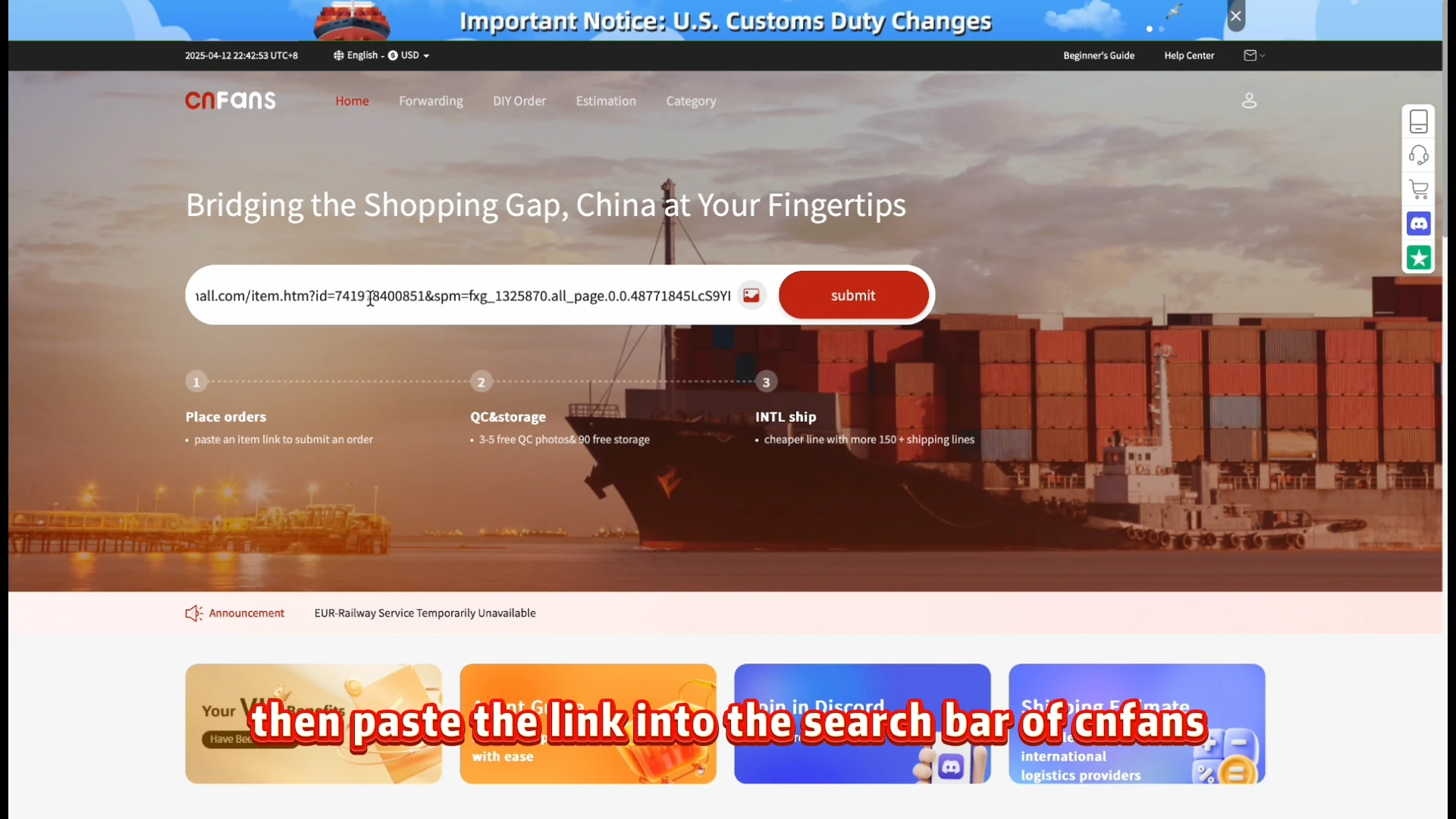
Open the seller product linked by the catalog and save its URL, sale date, time zone, stock condition and any quota wording. A countdown drawn into a product picture is not necessarily a working timer. Use the actual item link in the agent’s product search when ordering is available. A reservation, draw or group offer can require a different action from an ordinary purchase.
Choose a complete variant before the window
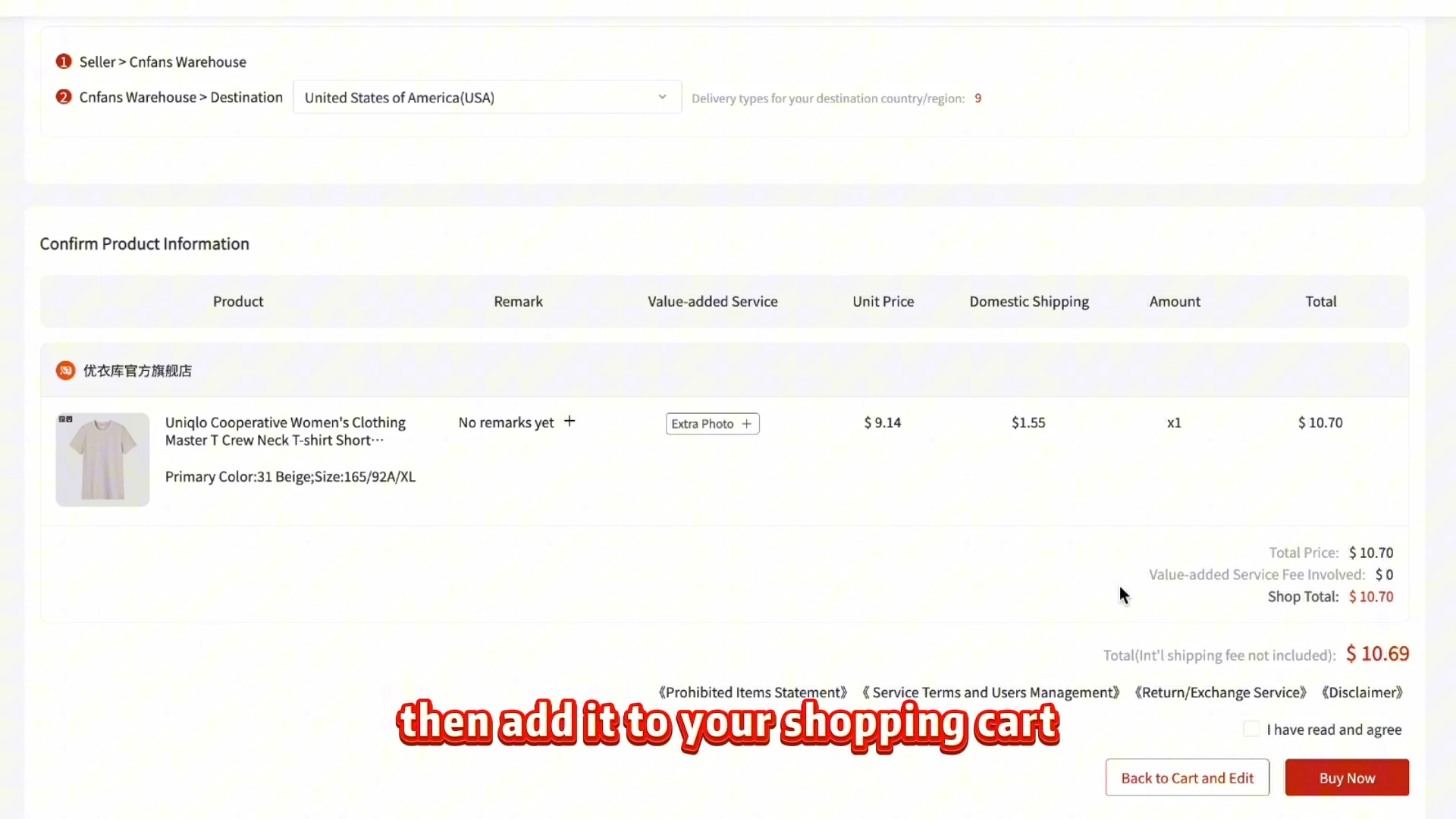
Select size, color, model and quantity, then review the exact choice. The cheapest size or color may have a different stock limit from the one you want. Do not leave the purchaser to infer a replacement variant from a gallery image. The historical confirmation screenshot shows the selected product after the option step, before you commit to the first checkout.
State the purchase limit and review payment
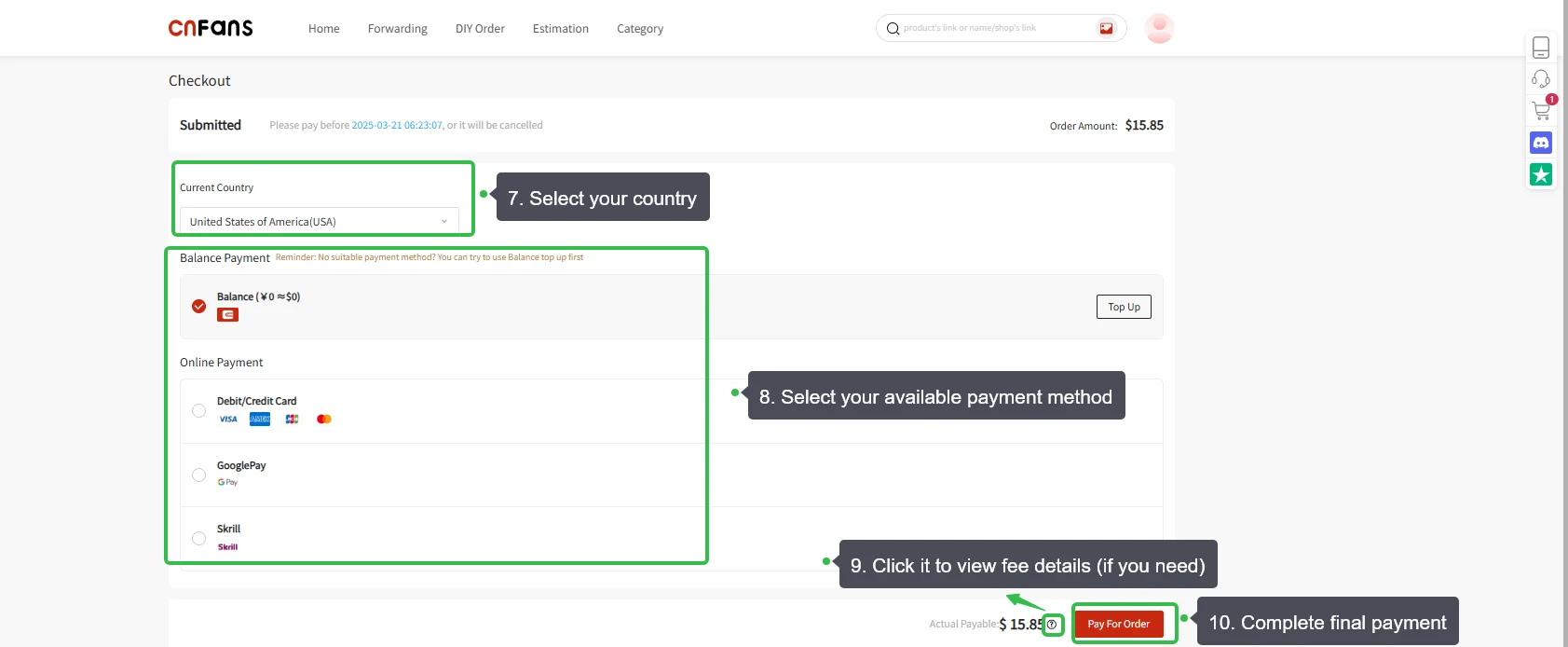
Read the goods and domestic-shipping total and the charges shown at checkout. If the offer price may disappear, make any price limit clear in the request and wait for confirmation that the instruction can be followed. This payment excludes later international freight. The tutorial does not establish a current rush-buying service, payment method or guaranteed purchase time.
Purchase and warehouse
Check whether the agent actually completed purchase
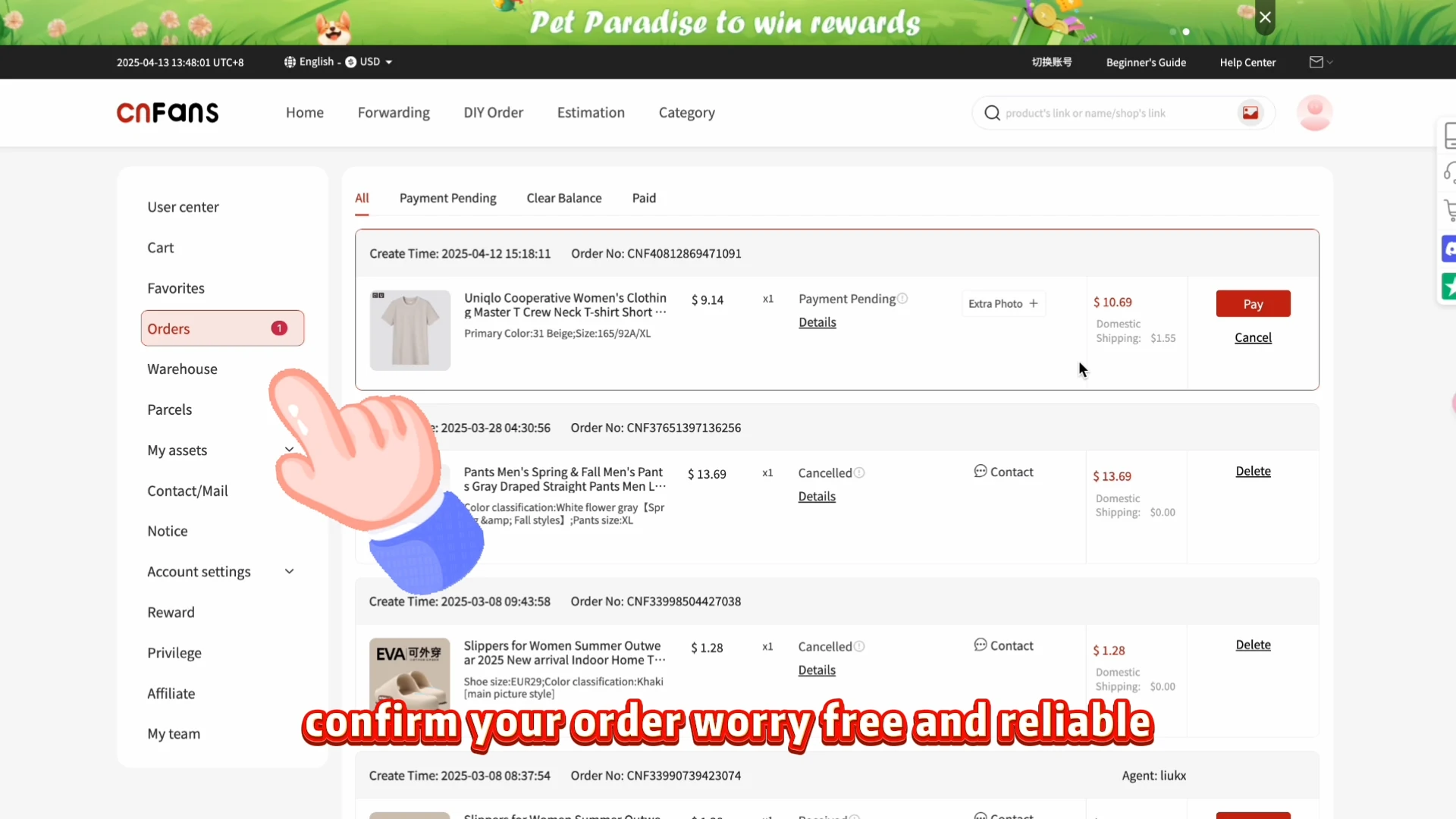
A request being paid or queued does not establish a seller purchase. Read the actual status and the purchaser’s response. If the window was missed, clarify whether the request is awaiting a price decision, cannot be fulfilled or has been cancelled; do not submit a duplicate blindly. The sample Orders page contains pending/cancelled examples, not a successful timed checkout.
Follow the purchased item to the warehouse
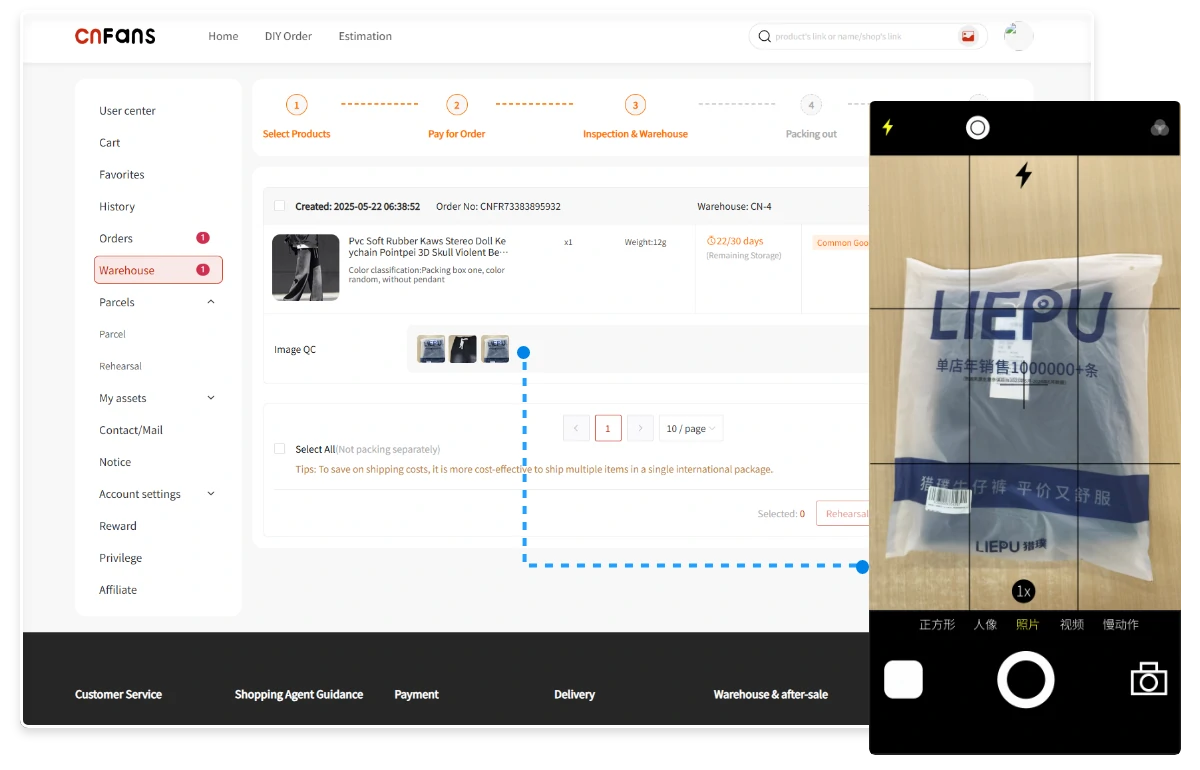
Once the seller purchase is confirmed, follow domestic dispatch to the Chinese warehouse. The sale countdown no longer tells you anything about this delivery. Track the specific order and allow the warehouse record to show receipt and processing separately. If the seller sends only part of the quantity, ask about the remaining units before treating the original order as complete.
Check the received goods after the rush
A successful purchase window is not a reason to skip inspection. Compare the received specification, count and visible condition with the saved order. Request a focused photograph if a critical detail cannot be seen. The Warehouse/QC interface demonstrates where evidence appears; it does not approve the pictured product. A deadline at the seller does not determine the after-sale terms.
International parcel
Choose eligible items for the parcel
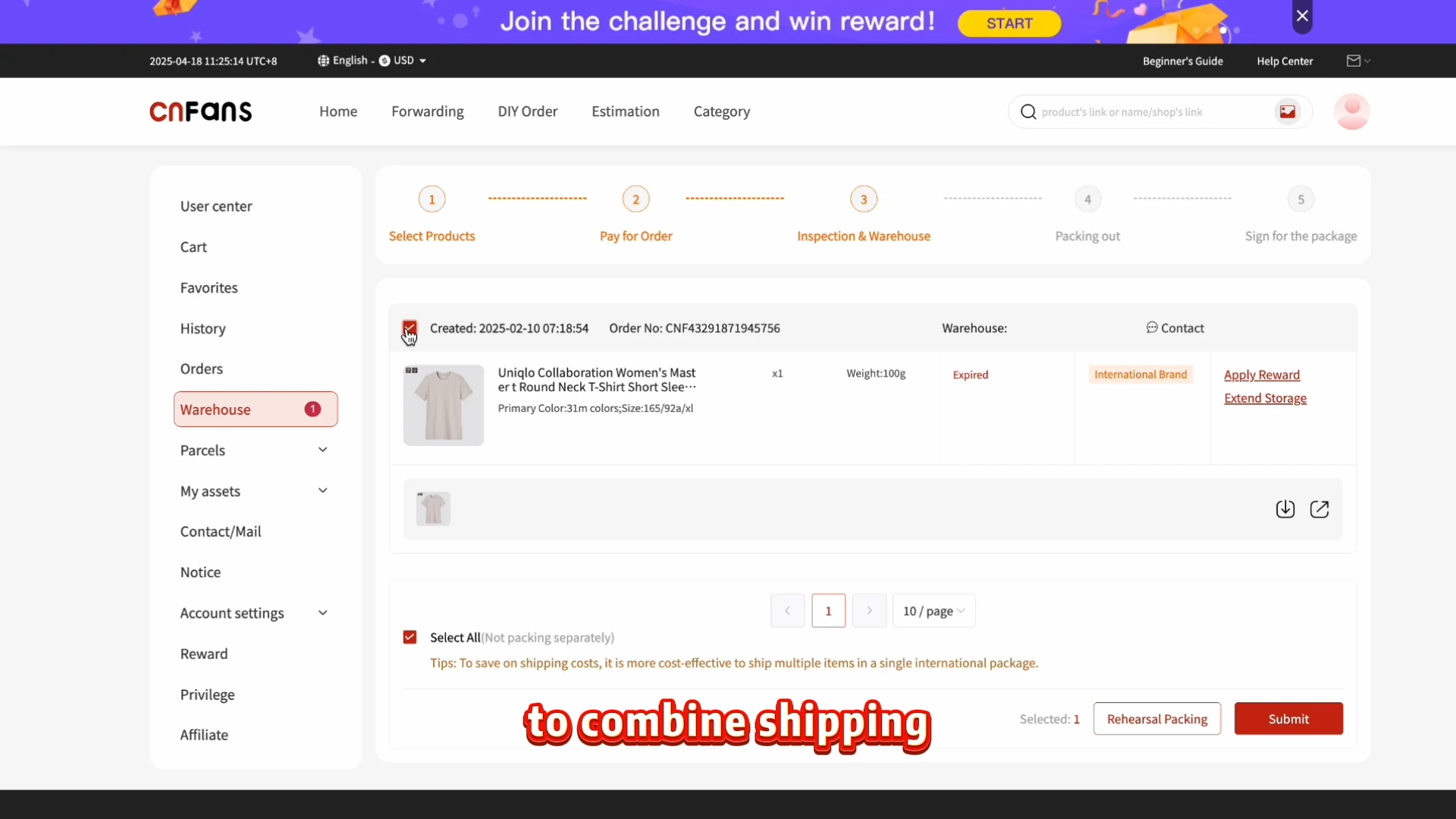
Resolve discrepancies before selecting the item for international dispatch. Check storage status, restrictions and the other items being combined with it. The archived Warehouse example includes an Expired warning; read and resolve such warnings before submission. There is no reason to include an unwanted replacement solely because you worked hard to obtain the original sale.
Review the route and pay the freight quote
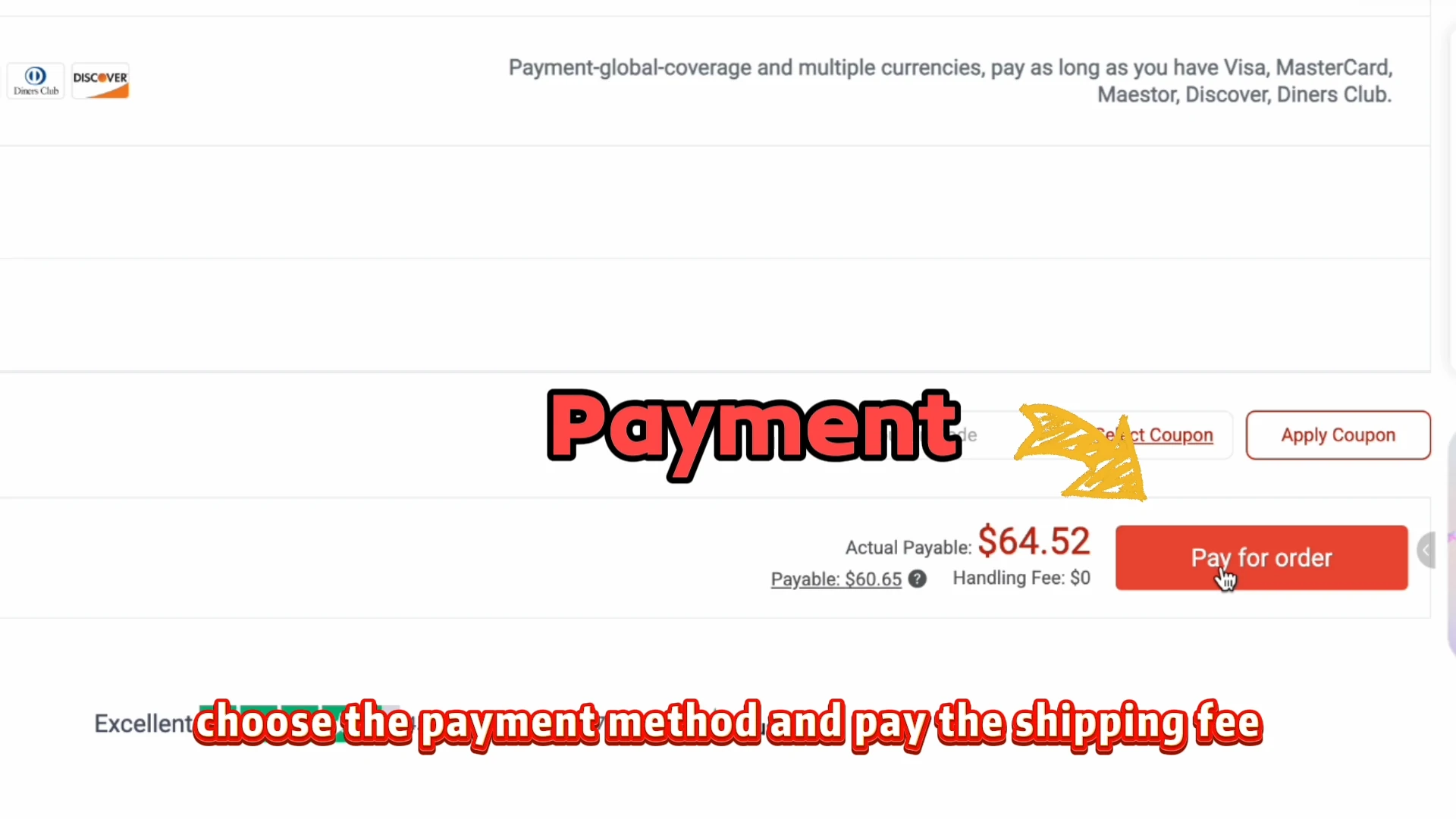
Compare the offered routes for the parcel’s actual contents, destination, packing and chargeable weight. The sale price does not include this quote, and faster purchasing does not imply faster international transit. Read the total and service terms before paying the freight. The historical screen is a payment example and does not give a usable present-day shipping estimate.
Follow carrier handover through delivery
Follow packing, dispatch and carrier collection separately. A created tracking number can precede the first carrier scan. On receipt, document any damaged outer packaging, count the items and compare them with the order. Keep the seller offer and confirmed purchase details until any issue is resolved, so the support request concerns the actual transaction rather than an expired advertisement.
Watch the historical official tutorial
The video shows the interface of its time. Its prices, payment options, promotions and storage wording are historical examples, not current terms.
Open the video player
If the video does not load, follow the nine illustrated steps in this guide. They cover the complete workflow without depending on the player.
Questions before starting
Does a Spreadsheet sell the item?
It is a discovery catalog and guide. The seller supplies the listing and variant; the agent handles a purchase request when its service is available.
Does the first payment include international shipping?
Not in the documented historical workflow. Goods and domestic delivery are handled first; international freight is quoted and paid after the warehouse stage.
Does a QC photograph approve the product?
No. It shows visible evidence to compare with your chosen variant. Missing details need a specific question, and a photograph cannot prove every quality or authenticity claim.
Can I order while the site shows a maintenance notice?
This guide does not establish an available checkout. It documents the historical process; verify the current official service before paying.
What this Spreadsheet helps you decide
The sale-flow tool highlights where different sale types can stop. This guide covers the complete sequence, including what to check if the purchase succeeds and what records to keep if it does not.
Current listing details and order messages take priority over an old screenshot. Use the detailed guide and help pages for costs, QC questions, shipping and the decisions that need a response from the agent. Help and questions.
A timer belongs to an offer, not to your agent payment
The Spreadsheet helps you identify a timed listing and read its conditions. It cannot hold a sale slot. In the historical CNFans workflow, a submitted and funded request still had to become a seller purchase. Record the product URL, complete option, the offer’s time zone, your maximum permitted amount and whether a change needs your approval.
| Event | What it establishes | What remains open |
|---|---|---|
| You send funds | A payment attempt or confirmed transaction | Whether the platform matched it to the item. |
| Platform payment confirmed | The request has funding recorded | Whether the seller purchase was placed or the promotion applied. |
| Purchase confirmation | The recorded seller purchase and option | Domestic delivery and warehouse inspection. |
| Warehouse item | An arrival record and any available QC | Eligibility, packing and international dispatch. |
Decide what to do if the offer expires
Ask whether the exact item can still be bought, at what total and under what conditions. If the current price exceeds your limit, request the available cancellation process rather than assuming a refund is automatic. Keep the purchase status: cancellation before seller purchase and a return after arrival are different requests.
Track goods, domestic delivery, displayed service and funding charges, then the later freight bill. Include conversion costs in the currency actually charged. Do not let the possible saving crowd out packing, destination charges or the cost of a second parcel. If a refund occurs, distinguish a platform credit from a withdrawal and final bank receipt.
Slow down at QC and at the parcel quote
A successful sale purchase is only one milestone. Compare the warehouse item with the exact option, quantity and any disclosed condition. If a label is wrong, preserve the order line and the label photograph. If fit is uncertain, request a measurement with endpoints rather than relying on a nominal size. Ask whether the extra view is available and chargeable.
GL and RL are community shorthand, not binding return instructions. Read any exception reason before accepting an item. Check return and storage deadlines separately, especially when waiting for a second timed release. Prepare an itemised parcel list and compare routes using the same packing request.
Freight may depend on packed dimensions as well as scale weight. Check the route’s calculation, rounding, restrictions, coverage and destination treatment; neither a product weight nor a historic tutorial amount is a shipping quote. Keep tracking creation separate from carrier collection.
Judge the guide by the decisions it makes clearer
Opening Bell explains timed labels and the gap between payment and purchase. Its clock examples are teaching aids, not live sale monitoring. Use the status record when money has moved and the missed-slot questions when the offer has changed. A good Spreadsheet links to the actual item and discloses what it cannot verify.
Choose a seller that can clarify the exact option and conditions. Choose an agent only after checking current access, payment terms, purchasing support, warehouse rules and the routes for your goods. CNFans’ archived process explains a purchasing service, not a speed advantage over Superbuy, CSSBuy or another agent. Compare current written answers instead of promises that a buyer will beat a timer.
Announcements and promotions need their original dates. The official service was showing maintenance in the last dated check; this historical guide does not verify an active checkout. Community reports reviewed on 22 October 2026 are examples of problems and follow-ups, not a performance sample. No verified Discord comments or private support records are represented here.